Vanilla+
the normal game with the fiddly bits smoothed out: better sorting, read books marked, a small health panel, reload all mags and more. the safe first modded server.
11 mods · 8 MB
v1.6 · Build 42 ready · free
host a Project Zomboid server without touching ini files or command lines, or join a friend's with exactly their mods and fixes.
open source (MIT) · signed by Mitchell Berg · no accounts, no tracking · is it safe?
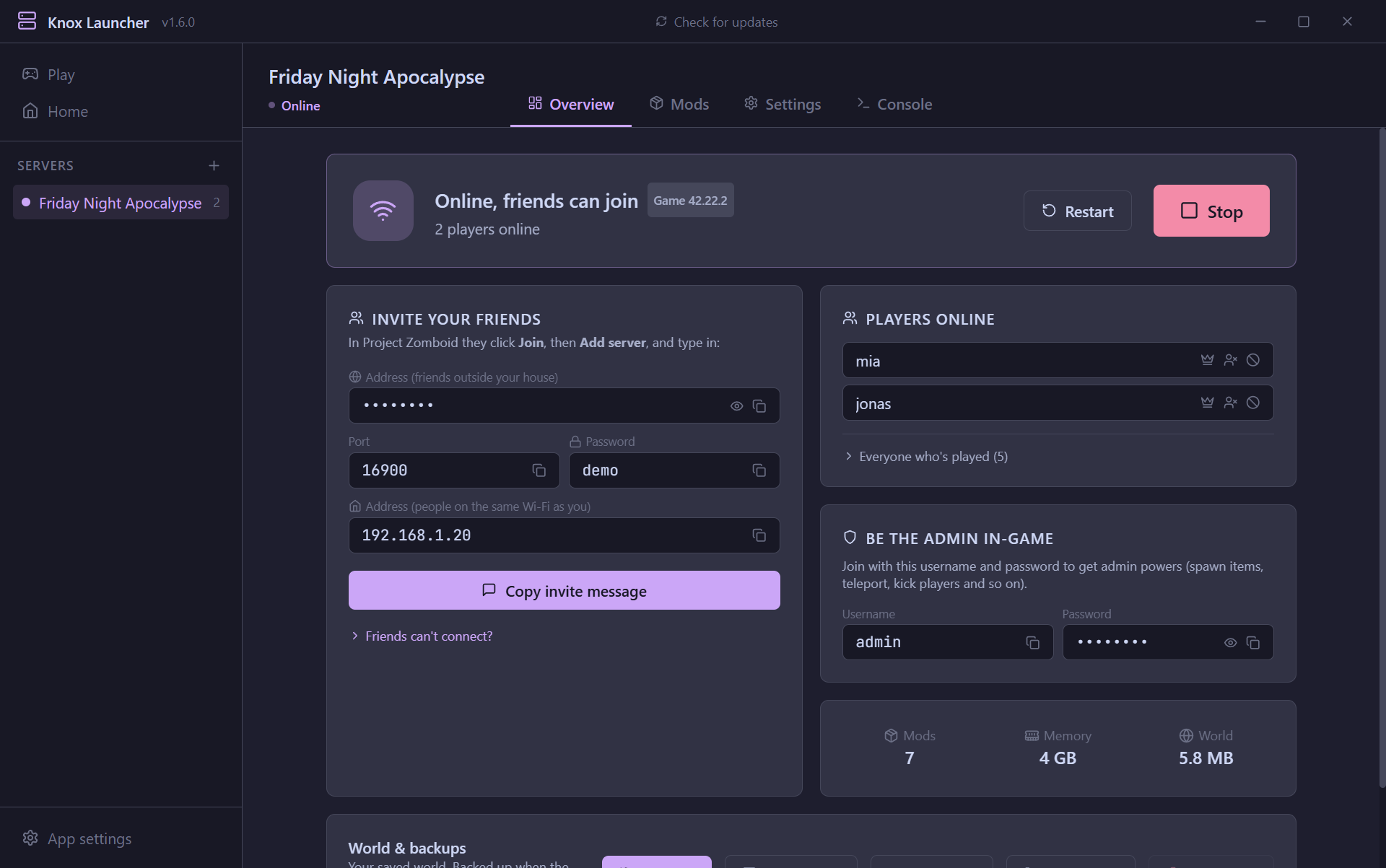
pick a name, a difficulty and some mods, hit start. knox launcher does the parts that usually take an evening of forum threads.
the setup screen downloads the Project Zomboid dedicated server for you (about 7 GB, once), or uses the one already in your Steam library.
name, difficulty, mods. the difficulties are the game's own Build 42 presets: Apocalypse, Outbreak, Extinction and Rising. for mods, pick one of the ready-made modded servers or choose your own.
it checks ports, memory and missing mods first and tells you how to fix anything. the first start with mods can take a few minutes.
when it says online, copy the invite message and paste it in your group chat. or send a server pack so they get your exact mods.
full guide: how to host a Project Zomboid Build 42 server on Windows
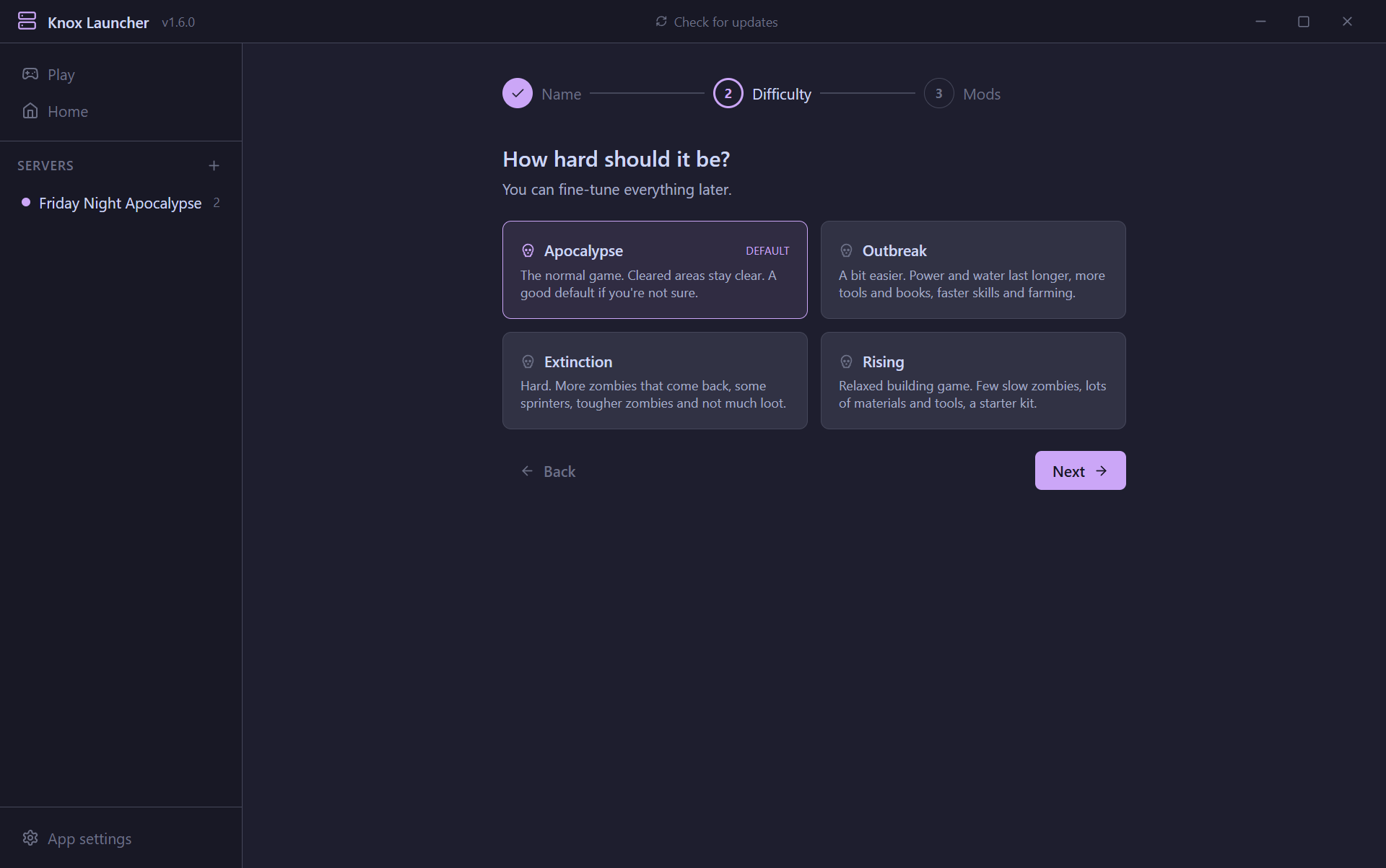
no more "which version of that mod do you have". the host sends you one small file and you're in.
the first time it opens. no server download needed. it finds your game through Steam on any drive.
the host sends a .pzpack file (Discord works). open it under Play.
it checks your mods against theirs and installs the host's fix mods with one click. Workshop mods download by themselves the first time you join.
pick a username, hit play. the game starts and joins, and the app shows exactly what to type in the login box (your password is already copied).
new in 1.6: host a copy of any server.
a server pack can carry the server's settings too (world, zombies, server options, never passwords). anyone with the pack can make a new server from it: same mods, same fix mods, same settings, fresh world.
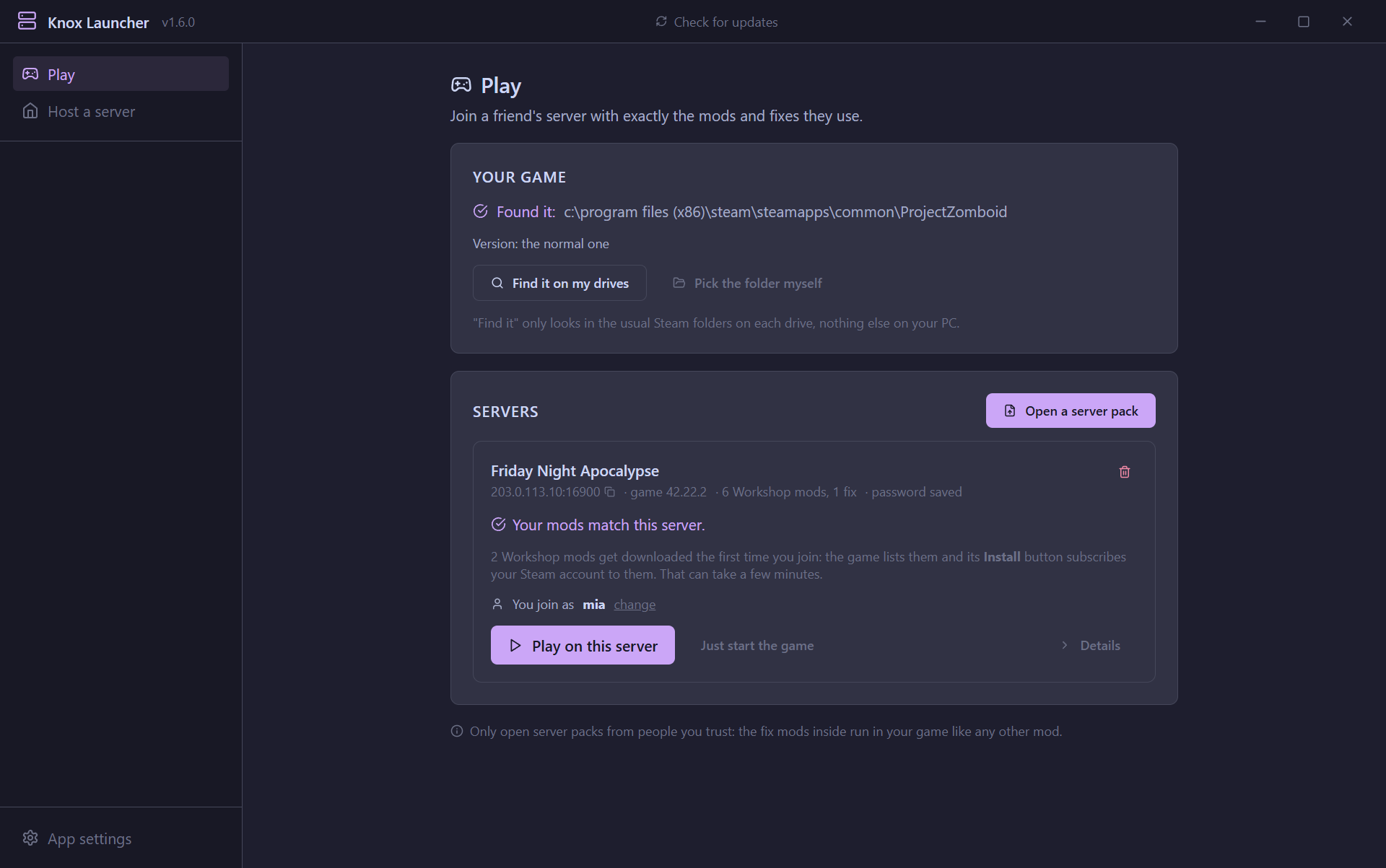
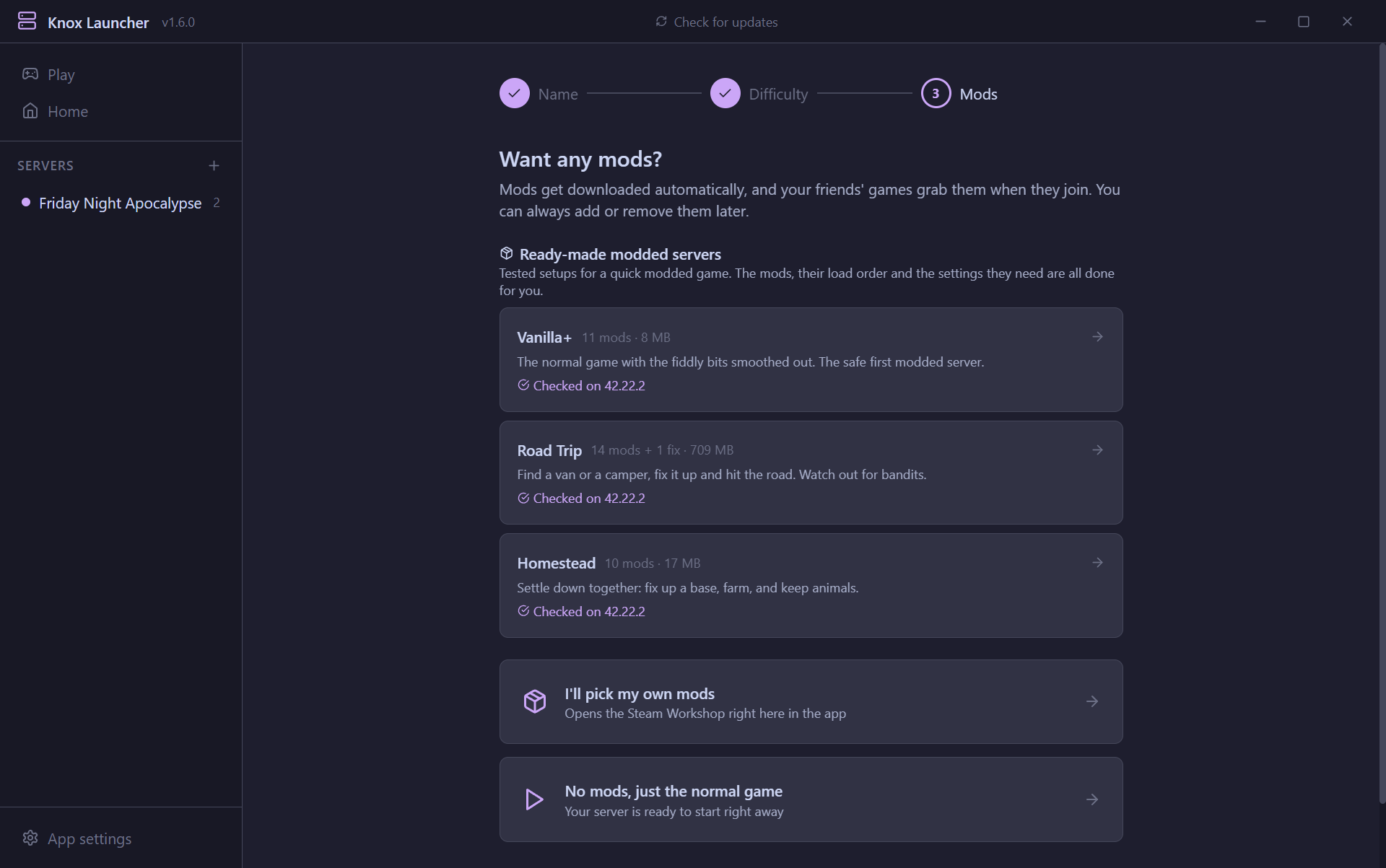
pick a ready-made modded server when you make a new one. the mods, their load order and the settings they need are done for you, and friends join with one server pack.
the normal game with the fiddly bits smoothed out: better sorting, read books marked, a small health panel, reload all mags and more. the safe first modded server.
11 mods · 8 MB
find a van or a camper, fix it up and hit the road. RVs you can walk inside, guns, and bandits to watch out for.
15 mods · 709 MB
settle down together: fix up a base, farm, and keep animals.
10 mods · 17 MB
each one is test-started on a real server before it ships, and the app shows which game version it was checked on. mod backups get turned on, so an author's bad update can't take your server down with it. rather pick your own? paste any Workshop collection and the app adds the mods they need, leaves out Build 41 mods and sorts the load order. guide: mods on a Project Zomboid server
Build 42.22.2 went to the public branch on november 9. if your server or your mods didn't take it well, going back used to mean digging through save folders and SteamCMD commands. in 1.6 it's a button.
one thing worth knowing: once a newer game version opens a world, the game upgrades the save and an older version can't load it anymore. so the backup from before the update is the one that counts, and knox launcher makes it automatically before the new version touches your world.
what it can't do for you
it can't switch your friends' games. everyone switches their own game branch in Steam, so knox launcher spots the mismatch and tells them exactly what to pick. and the Steam Workshop only ever serves the newest version of a mod, which is why mod backups keep the older copy for you.
every server and sandbox setting is still there when you want it. you just don't have to start there.
settings come from the game's own files, so the Build 42 loot, zombie and XP presets really apply. starting a server no longer resets your mod settings.
hit + add on any mod. required mods come along, and the app reads the real mod ids out of the files instead of guessing. paste a whole collection and it adds what the mods need, leaves out Build 41 mods and sorts the load order.
drag to reorder or sort automatically from what each mod says it needs. warns about missing requirements, clashes and mods made for the other build. map mods go in the map list for you.
one small .pzpack file with your mod list, fix mods, address and (if you want) settings. friends match your mods with one click, or host their own copy.
keeps a copy of every Workshop mod your servers use. if a mod gets pulled from the Workshop or an update breaks it, switch to your saved copy from the Mods tab.
the world plus its settings, players, mod list and game version, every start and every 30 minutes while people play. backups only store what changed, and older ones thin out by themselves.
ports, memory and missing mods get checked before you start, with a fix button where it can. it knows when the server is actually ready, and if a mod stops the world loading, it tells you which mod and why.
a step-by-step playit.gg guide so nobody touches the router, a router (UPnP) check, and a Windows Firewall rule that only opens the game ports.
see who's online, kick, ban or make someone admin. 1.6 adds a list of everyone who's ever played, with unban right on the overview.
restarts after a crash, when a mod updates or once a day, with a warning in chat first. servers can start when the app opens, and the app can start with Windows.
paste a channel webhook and get a message when the server comes online (with the address), crashes, restarts or stops. player joins too, if you want.
a console with server commands over RCON, raw file editing, mod ids, ports, launch modes and Build 41. hidden until you turn advanced mode on.
hide your public IP and admin password on screen with one click, so you can stream or share a screenshot without giving them away.
every server gets its own folder so two can run side by side, downloads show real progress, the back and forward buttons on your mouse work, and only one copy of the app runs at a time.
a server tool runs on your pc and opens ports, so you should be able to see what it does. here's how.
releases are signed with Microsoft Artifact Signing. Windows shows the publisher as Mitchell Berg, the developer, whose identity Microsoft verified.
GitHub Actions builds and signs each release straight from the source on GitHub. pull requests and test builds are never signed.
the app updates itself, and only runs an update's installer after checking it's signed the same way.
no analytics, no ads, nothing sent to the developer. it only talks to GitHub, Steam and the services you turn on. this site doesn't track you either.
"Windows protected your PC"?
for a while after a new release, SmartScreen can still show that, because it wants to see enough downloads first. click More info, check the publisher says Mitchell Berg, then Run anyway. details are in the code signing policy, including the full privacy policy.
with knox launcher: install it, pick "host my own server", let it download the dedicated server (about 7 GB, once), make a server (name, difficulty, mods) and hit start. it sets up the Windows Firewall rule and tells you what to send your friends.
doing it by hand works too. the hosting guide covers both ways.
yes. free and open source under the MIT license. no paid version, no ads, no account.
no. the Project Zomboid dedicated server is a free download from Steam and the app gets it for you. everyone who wants to play on the server needs their own copy of the game. you don't need a paid hosting service either, your own pc is the server.
Build 42 is the default, including its new presets and settings. Build 41 still works from the legacy41 branch: turn on advanced mode in app settings and pick it there.
one of you hosts a server (on your own pc is fine), everyone else joins it. the easiest way to join is a server pack: the host makes it from their server's Mods tab (Import / Export → Share with players), you open it under Play and the app matches your mods to theirs.
or just type the address into the game: Join, then Add server.
the usual three: the Windows Firewall rule (the app adds it), port forwarding on your router (UDP 16261 and 16262), and everyone on the same game version with no beta branch. the easiest fix is playit.gg, which skips the router part. there's a whole guide for this.
the quickest way: when you make a new server, pick one of the ready-made modded servers (Vanilla+, Road Trip or Homestead) and everything is set up for you. to choose your own, open the server's Mods tab, browse the Steam Workshop right in the app and hit + add. it downloads the mod, finds the real mod ids, adds required mods and map mods, and sorts the load order. friends' games download the same Workshop mods when they join. more in the server mods guide.
if mod backups were on (app settings → Mod backups), the Mods tab can switch the server to your saved copy. friends get that copy from your server pack. the Workshop itself only serves the latest version, so turn mod backups on before you need them.
yes, in 1.6. the roll back button takes the world, settings and mod list back to "before the last game update" (or about an hour ago, yesterday, last week) and switches the server to the matching Steam branch when Steam still has it. players switch their own game branch in Steam, and the app tells them which one. it needs a backup from before the update, because the game upgrades a world the first time a newer version opens it; knox launcher makes that backup automatically. the rollback guide also shows how to do it by hand.
yes, lots of people do. leave enough memory for your own game: the server's memory slider shows how much your pc has. join your own server with the "same Wi-Fi" address from the overview page.
no. the app is signed, but SmartScreen can still warn about a brand new release until enough people have downloaded it. click More info, check the publisher is Mitchell Berg, then Run anyway. if it says unknown publisher, don't run it and download it again from the GitHub releases page.
open server packs from people you trust. the pack's mod list is just a list, but the fix mods inside run in your game like any other mod. the app lists the fix mods in a pack (under Details) and only installs them when you click Install.
not right now. knox launcher is a Windows app (Windows 10 and 11, 64-bit).
no. knox launcher is an unofficial, fan-made tool by one developer. it isn't affiliated with or endorsed by The Indie Stone. it uses the regular Project Zomboid dedicated server from Steam, it doesn't change the game.
it's named after Knox Country, where the game takes place. it used to be called PZ Server Manager, which is why the repo is still pz-server-manager.
free, open source, and the next time an update breaks everything, you've got a way back.