How to add mods to a Project Zomboid server (Build 42)
short version
- every Workshop mod has two names: a Workshop id (the number in its Steam link) and one or more mod ids (inside its files). the server needs both.
- they go on the
WorkshopItems=andMods=lines of the server's.ini. map mods also go onMap=. - players don't install Workshop mods by hand: the game downloads them when they join.
- order matters. a mod has to load after the mods it needs.
Workshop ids vs mod ids
this trips up almost everyone. a Workshop item is a download on Steam. inside it there can be one mod or several (an addon, a "lite" version, a map). each of those has its own mod id.
- Workshop id: the number at the end of the mod's Steam link,
steamcommunity.com/sharedfiles/filedetails/?id=2392709985. - mod id: the
id=line in the mod'smod.infofile. once the server has downloaded the mod, it's insteamapps\workshop\content\108600\[Workshop id]\mods\[mod folder]\in the server folder. a lot of Workshop pages list it in the description, but not always correctly.
knox launcher reads the mod ids out of the downloaded files, so there's no guessing. if a Workshop item has several mods, it lets you pick which ones.
The ini lines
in %USERPROFILE%\Zomboid\Server\[ServerName].ini, with the server stopped:
WorkshopItems=2392709985;2200148440
Mods=\ModA;\ModB
Map=SomeMapMod;Muldraugh, KYWorkshopItems: Workshop ids, separated by;. this is what the server and players download.Mods: mod ids, in load order. in Build 42 each one starts with a backslash (\ModA). Build 41 doesn't use the backslash.Map: map mods' map folder names first, the base mapMuldraugh, KYlast.
Load order
mods load in the order of the Mods= line. a mod that needs another one has to come after it. Build 42 mods can say this in their mod.info with require=, loadModAfter= and loadModBefore=.
in knox launcher, drag mods to reorder, or hit Sort automatically and it orders them from what each mod says it needs. it also warns about mods that clash, mods made for the other build, and requirements you don't have.
The quick way: a ready-made modded server
new to modding? when you make a new server in knox launcher, the mods step has three tested setups. the mods, their load order and the settings they need are done for you, and each one is test-started on a real server (the card says which game version it was checked on):
- Vanilla+ (11 mods, 8 MB): the normal game with the fiddly bits smoothed out. the safe first modded server.
- Road Trip (15 mods, 709 MB): vans and campers you can walk inside, guns and bandits.
- Homestead (10 mods, 17 MB): base building, farming and animals.
mod backups get turned on for you, and friends join with one server pack, fix mods included.
Adding mods with Knox Launcher
- open your server → Mods. the Steam Workshop opens right inside the app.
- hit + add on any mod. required mods get added too, and the download starts straight away.
- got a Workshop collection? paste its link under Install or check a modpack to add everything in it. it finds the mods each mod needs (even ones the collection forgot), leaves out mods made for Build 41 and sorts the load order once they've downloaded, then tells you what it did.
- map mods go into the map list for you. check the order looks right.
- restart the server. the overview tells you if anything's missing before it starts.
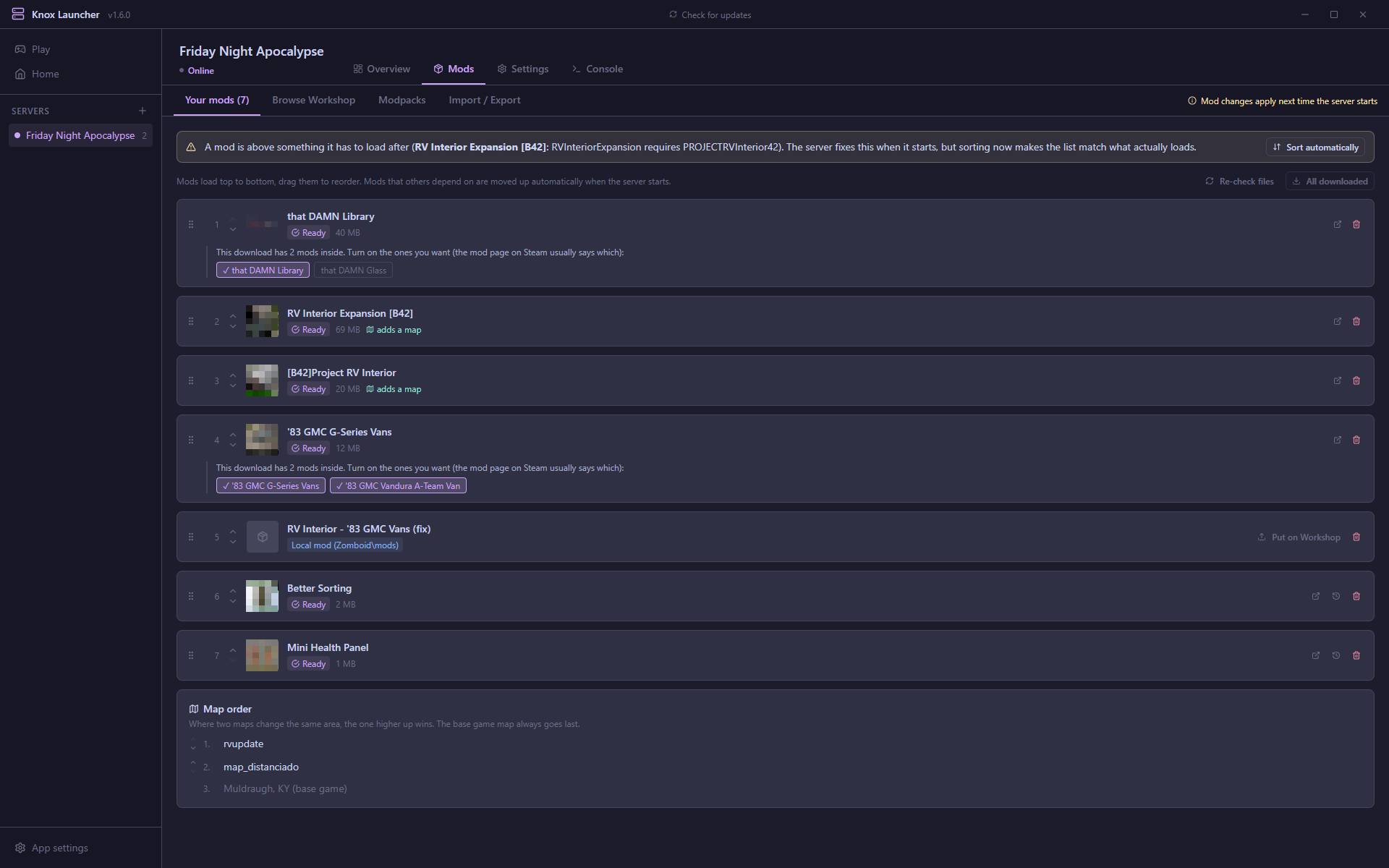
already have a mod list from another server? paste the WorkshopItems= and Mods= lines into Import mods, or load the whole .ini.
Keeping friends in sync
- Workshop mods download by themselves when a friend joins. the first join with a big modpack can take a while.
- mods that aren't on the Workshop (small fix mods, your own mods) need to be in every player's
%USERPROFILE%\Zomboid\mods. a knox launcher server pack carries those, and friends install them with one click. - when a mod updates on the Workshop while the server runs, players with the new version can't join until the server restarts. knox launcher restarts by itself with a 5 minute warning in chat (you can turn that off).
When a mod gets pulled or an update breaks it
the Workshop only serves the newest version of a mod, and a removed mod is just gone. turn on mod backups in knox launcher's app settings and it keeps a copy of every Workshop mod your servers use (the last 2 versions of each). if a mod disappears or an update breaks it, the Mods tab can switch to your saved copy. friends get it from your server pack (fine for small mods, a pack can hold up to 50 MB).
after a game update broke a bunch of mods at once? see rolling back after the 42.22 update.
Build 41 mods on a Build 42 server
mods are made for one build. Build 42 mods have a 42 folder inside the mod, Build 41 mods don't. a B41-only mod won't load on a B42 server. knox launcher warns you about mods made for the other build.
Common mod problems
- server stops while loading mods: look at the end of
server-console.txt. it usually names the mod. most often it's a missing required mod, a wrong mod id, or a mod that doesn't work with your game version. knox launcher 1.6 reads the log for you and says which mod stopped the world loading. - a mod's features don't show up: its mod id isn't on the
Mods=line (only the Workshop id is), or it loads before something it needs. - a map mod doesn't appear: it's missing from
Map=, or it comes afterMuldraugh, KY. - mod settings keep resetting: older versions of knox launcher reset mod settings on start. 1.6 doesn't.