How to host a Project Zomboid Build 42 server on Windows
short version
- the Project Zomboid dedicated server is free on Steam. your pc can be the server, no paid hosting needed.
- you need about 7 GB of disk for the server files (plus your mods) and around 8 GB of memory for the server itself.
- friends connect on UDP 16261 and 16262. those ports have to get through Windows Firewall and your router.
- easiest: Knox Launcher does all of it in a few clicks. by hand: SteamCMD,
StartServer64.batand a couple of config files.
What you need
- Windows 10 or 11, 64-bit. any pc that runs the game well can run a small server.
- disk: about 7 GB for the server files, plus room for mods. big modpacks can add several GB.
- memory: 8 GB for the server is good for most groups, more if you run lots of mods. if you're also playing on the same pc, leave enough for Windows and your own game. 16 GB total is tight for both, 32 GB is comfortable.
- a decent upload speed. the server sends the world to everyone, so upload matters more than download.
- everyone needs the game on the same version as the server. the server itself doesn't need a copy of the game.
The easy way: Knox Launcher
knox launcher is a free, open-source Windows app that sets up and runs the dedicated server for you. it uses the normal Project Zomboid dedicated server from Steam, it just takes care of the files and settings.
- download and install it from the releases page (
Knox-Launcher-Setup-x.x.x.exe). if Windows says it "protected your pc", click More info, check the publisher says Mitchell Berg, then Run anyway. - pick "host my own server". the setup screen downloads the dedicated server (about 7 GB, once). if you already have "Project Zomboid Dedicated Server" in your Steam library, it can use that one.
- let it allow the server through Windows Firewall. Windows asks once. the rule only opens the game ports, not the admin console.
- create a server: a name, an optional join password, then a difficulty. the four choices are the game's own Build 42 presets:
- Apocalypse: the normal game. a good default if you're not sure.
- Outbreak: a bit easier. power and water last longer, more tools and books.
- Extinction: hard. more zombies that come back, some sprinters, not much loot.
- Rising: relaxed building game with few, slow zombies.
- add mods if you want. the quickest way is a ready-made modded server: Vanilla+, Road Trip or Homestead, with the mods, load order and settings done for you. or open the Steam Workshop inside the app and hit + add on anything. (more in the mods guide.)
- hit start. it checks ports, memory and missing mods first. the first start with mods can take a few minutes while everything downloads and loads.
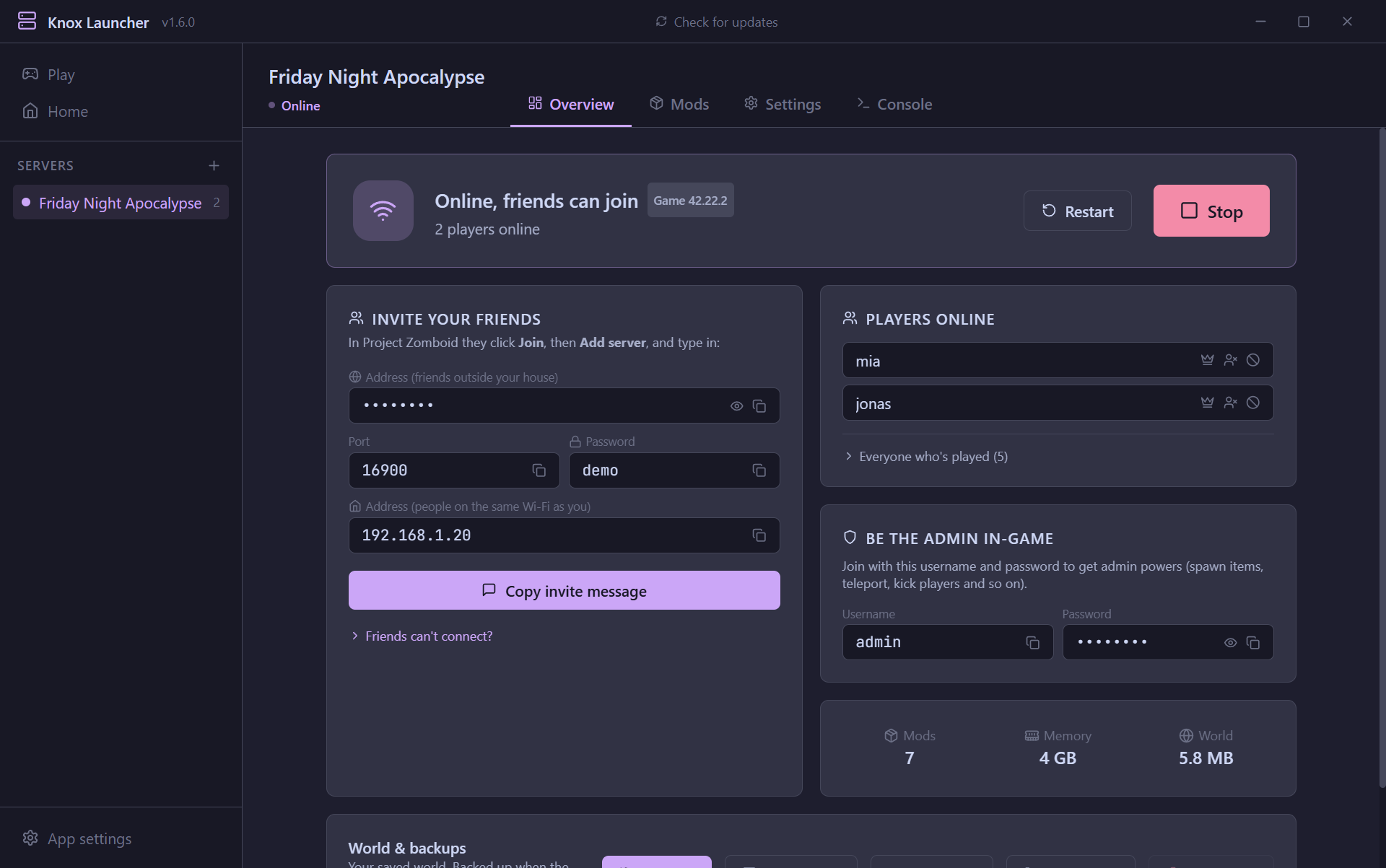
- when it says "Online, friends can join", use Copy invite message on the overview page and paste it in your group chat. it has the address, port and password.
friends outside your house still need a way in: either forward the ports on your router, or use the playit.gg setup in app settings, which skips the router. the friends can't join guide covers both.
The manual way: SteamCMD
if you'd rather do it yourself, this is the whole thing. it's what knox launcher does under the hood.
1. download the server files
get SteamCMD from Valve and unzip it somewhere like C:\steamcmd. then open a command prompt in that folder and run:
steamcmd.exe +force_install_dir C:\PZServer +login anonymous +app_update 380870 validate +quit380870 is the dedicated server's Steam app id, and anonymous works because the server is free. for Build 41, add -beta legacy41 right after 380870.
2. start it once
run StartServer64.bat in C:\PZServer. the first time, it asks you to pick an admin password. the server is called servertest unless you start it with -servername yourname. wait until the console prints SERVER STARTED, then type quit to stop it cleanly.
don't click inside the server's console window.
Windows' QuickEdit mode pauses the window when you click in it, and the server freezes on its next log line. players get a black screen. press Esc to unfreeze it, or turn QuickEdit off in the window's properties. (knox launcher turns it off for the server window only.)
3. change the settings
the first start makes the config files in your user folder:
| file | what's in it |
|---|---|
%USERPROFILE%\Zomboid\Server\servertest.ini | server options: name, password, max players, PvP, ports, mods |
%USERPROFILE%\Zomboid\Server\servertest_SandboxVars.lua | world and zombie settings (the difficulty) |
%USERPROFILE%\Zomboid\Saves\Multiplayer\servertest\ | the world save |
%USERPROFILE%\Zomboid\server-console.txt | the server log |
edit them while the server is stopped. the server rewrites them on start, so changes made while it's running can get lost.
4. give it enough memory
open StartServer64.bat in a text editor and find -Xmx. -Xmx8g means 8 GB. keep a copy of your change, because a server update can replace the file.
5. let friends in
- Windows Firewall: allow
C:\PZServer\jre64\bin\java.exeon UDP 16261 and 16262, private and public networks. - your router: forward UDP 16261 and 16262 to your pc's local address (something like
192.168.1.20). - your address: friends outside your house use your public IP (search "what is my ip"), people on your Wi-Fi use your local address. port
16261.
stuck? this guide goes through every reason a friend can't connect.
Once it's running
- be the admin in-game: join with username
adminand the admin password you picked. admins can spawn items, teleport, kick and ban. - keep backups. copy the world folder before big changes and game updates. knox launcher backs up the world every time the server starts and keeps the last few.
- update the server when the game updates. if the server is on an older version than your friends' games, nobody can join. run the same SteamCMD command again (with the server stopped), or let knox launcher do it from app settings. if an update breaks things, see how to roll back.
- restart it now and then. long-running servers slowly get laggy. a daily restart helps (knox launcher can do it with a warning in chat).
First-start problems
- it takes forever the first time: normal with mods. the server downloads every Workshop mod before it finishes starting.
- "address already in use" in the log: another server (or a copy of this one) is still running on that port. close it, or give the second server a different port.
- it stops right after starting with a mod error: usually a missing required mod or a wrong mod id. the mods guide explains Workshop ids vs mod ids.
- it runs out of memory: raise
-Xmx, or trim the modpack.