Server broke after the 42.22 update? How to roll back a Project Zomboid server
short version
- stop the server and back everything up, even the broken state.
- decide whether to wait for mod fixes or go back.
- to go back: switch the server to the 42.21 fall-back branch, restore a world backup from before the update, and have every player switch their game to the same branch in Steam.
- mods that already updated for 42.22 might not work on 42.21. the Workshop only serves the newest version, so you need a saved copy or have to leave that mod out for now.
What happened
Build 42.22.2 went to the public branch on november 9, 2026. Steam updated the game for everyone, and a lot of servers and mods stopped working: servers that won't start, mods that throw errors, players who can't join a server that's on a different version than their game. The Indie Stone kept a temporary 42.21 fall-back branch on Steam, so you can go back while mods catch up.
1. Stop and back up first
before you change anything, stop the server and copy these somewhere safe (a folder on your desktop is fine):
| what | where (default server name is servertest) |
|---|---|
| the world | %USERPROFILE%\Zomboid\Saves\Multiplayer\[ServerName]\ |
| player accounts | %USERPROFILE%\Zomboid\db\[ServerName].db |
| server settings | %USERPROFILE%\Zomboid\Server\[ServerName].ini, [ServerName]_SandboxVars.lua and the other [ServerName]_* files |
knox launcher also keeps its own world backups (one every time the server starts) in %USERPROFILE%\Zomboid\pzm-backups\[ServerName]\. check the dates: the useful ones are from before november 9.
don't keep restarting the server on 42.22 if you plan to go back.
the first time 42.22 opens a world, it upgrades the save (the world version goes from 249 to 251), and 42.21 can't load it after that. so going back needs a backup made before the update.
2. Wait, or go back?
- wait if the server starts and the problem is one or two mods. mod authors usually push fixes within days. take the broken mods off for now and keep playing.
- go back if the server won't start, a mod your world depends on is broken (maps, vehicles, big overhauls), or your group just wants to keep playing tonight.
3. Switch the server to the fall-back branch
the fall-back branch is called 42.21 (as of november 10, 2026). it's temporary, so if it's gone, check Steam: Library → Tools → Project Zomboid Dedicated Server → Properties → Betas (Game Versions & Betas in newer Steam) for what's there now. then, with the server stopped:
steamcmd.exe +force_install_dir C:\PZServer +login anonymous +app_update 380870 -beta 42.21 validate +quitreplace C:\PZServer with your server folder. if your server came from your Steam library instead of SteamCMD, pick 42.21 in that Betas dropdown and let Steam download it.
check it worked: start the server and look near the top of %USERPROFILE%\Zomboid\server-console.txt for the version.
4. Restore the world from before the update
if the world was opened on 42.22, put back a copy from before november 9:
- by hand: with the server stopped, rename the current world folder (don't delete it), then copy the backup into
Saves\Multiplayer\[ServerName]\. do the same fordb\[ServerName].dbif your backup has one. - in knox launcher: overview → World → Backups → Restore next to a backup from before the update. it backs up the current world first, so you can undo it.
if the world was never started on 42.22, you can skip this step.
5. Deal with mods that already updated
this is the annoying part. the Steam Workshop always gives you the newest version of a mod, there's no "download the old one" button. if a mod's author already updated it for 42.22, that new version might not work on 42.21.
- saved copies: knox launcher's mod backups (app settings → Mod backups) keep the last 2 versions of every Workshop mod your servers use. if it was on before the update, the Mods tab can switch that mod to your saved copy. friends get the copy from your server pack.
- leave it out for now: if the mod isn't something the world depends on, disable it until you go forward again.
- check the mod's Workshop page: some authors post a note or keep an older version for players on the fall-back branch.
6. Every player switches their game too
the server can't do this part for anyone. each player:
- in Steam, right-click Project Zomboid → Properties → Betas.
- pick the same fall-back branch as the server (42.21).
- wait for Steam to finish downloading it, then join as usual.
if one person is still on 42.22, they won't be able to join. that's the version check doing its job.
7. Going forward again
once the mods you need are updated, move everyone back together: players set Betas back to none, you switch the server back with the same SteamCMD command without -beta 42.21, then back up and start it. the fall-back branch is temporary, so don't plan to stay on it forever.
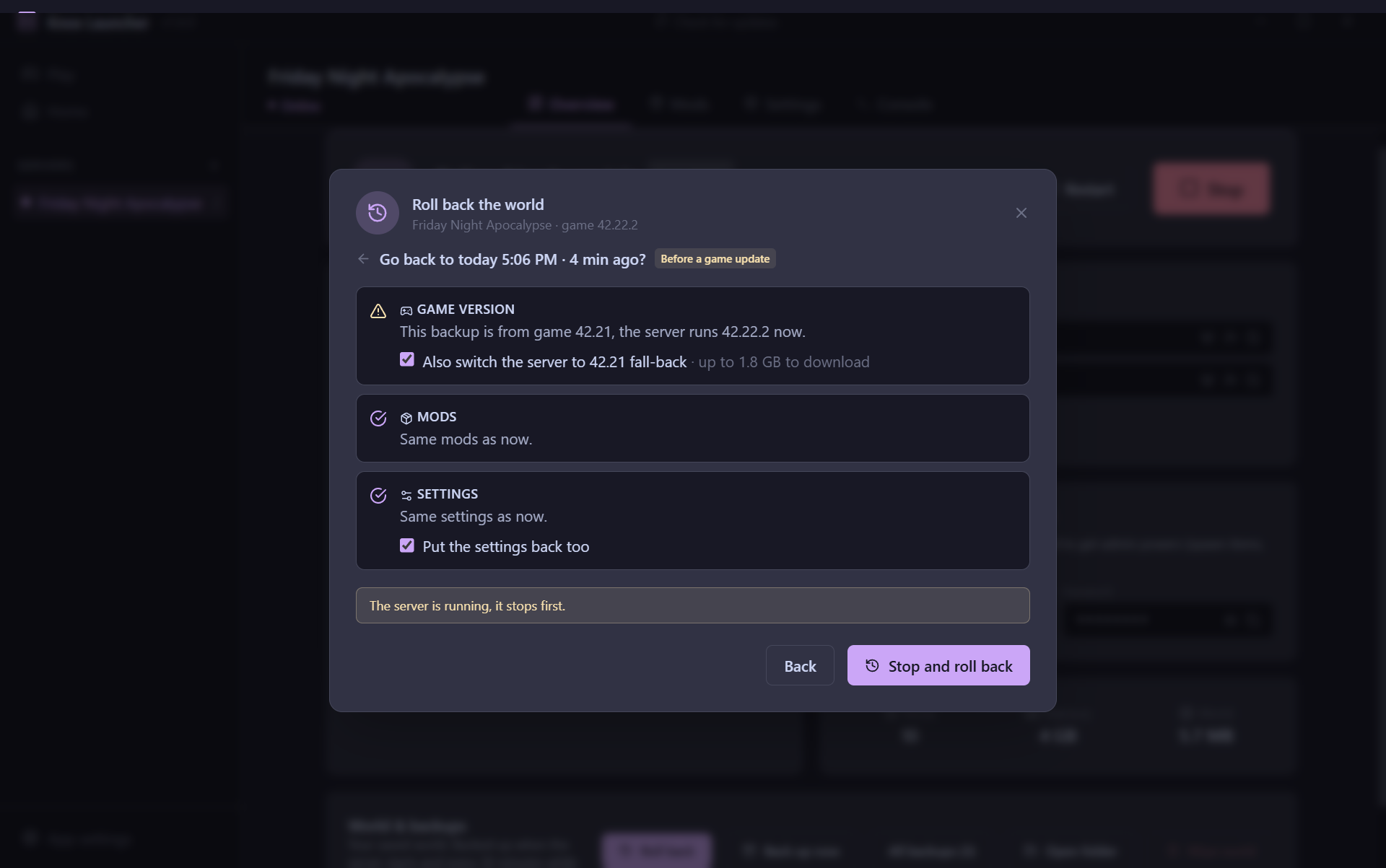
The easy way: rollback in Knox Launcher 1.6
everything above, as a button on the server's overview. knox launcher 1.6 adds:
- full backups. each backup has the world plus the server's settings, players, mod list and the game version it was running. they happen every start, every 30 minutes while people play, and before every game or mod update.
- the backup that counts. when the game version changes, the app backs up the world before the new version opens it, even if backups are off, so there's always a copy the old version can load.
- plain options: "before the last game update", "about 1 hour ago", "yesterday", "last week", or any backup from the list.
- a check first. game version, mods and settings. if the backup is from an older game version, it switches the server to the matching Steam branch (like the 42.21 fall-back). it won't put a newer world on an older game, and says why.
- undo. the world as it is now gets backed up first.
- player guidance. when a friend's game is on a different version, the app says exactly which branch to pick in Steam, and the invite message includes it. (it can't switch their game for them.)
- update guard. holds game updates for your server until you hit back up & update, so the next big update doesn't catch you at 2am.
Next time
- turn on mod backups now, before you need them.
- keep more world backups around big updates (knox launcher keeps up to 20).
- don't update the server the same day a big patch lands. let the mods catch up first.